

 Jinba Flow
 Jinba App
 Jinba Toolbox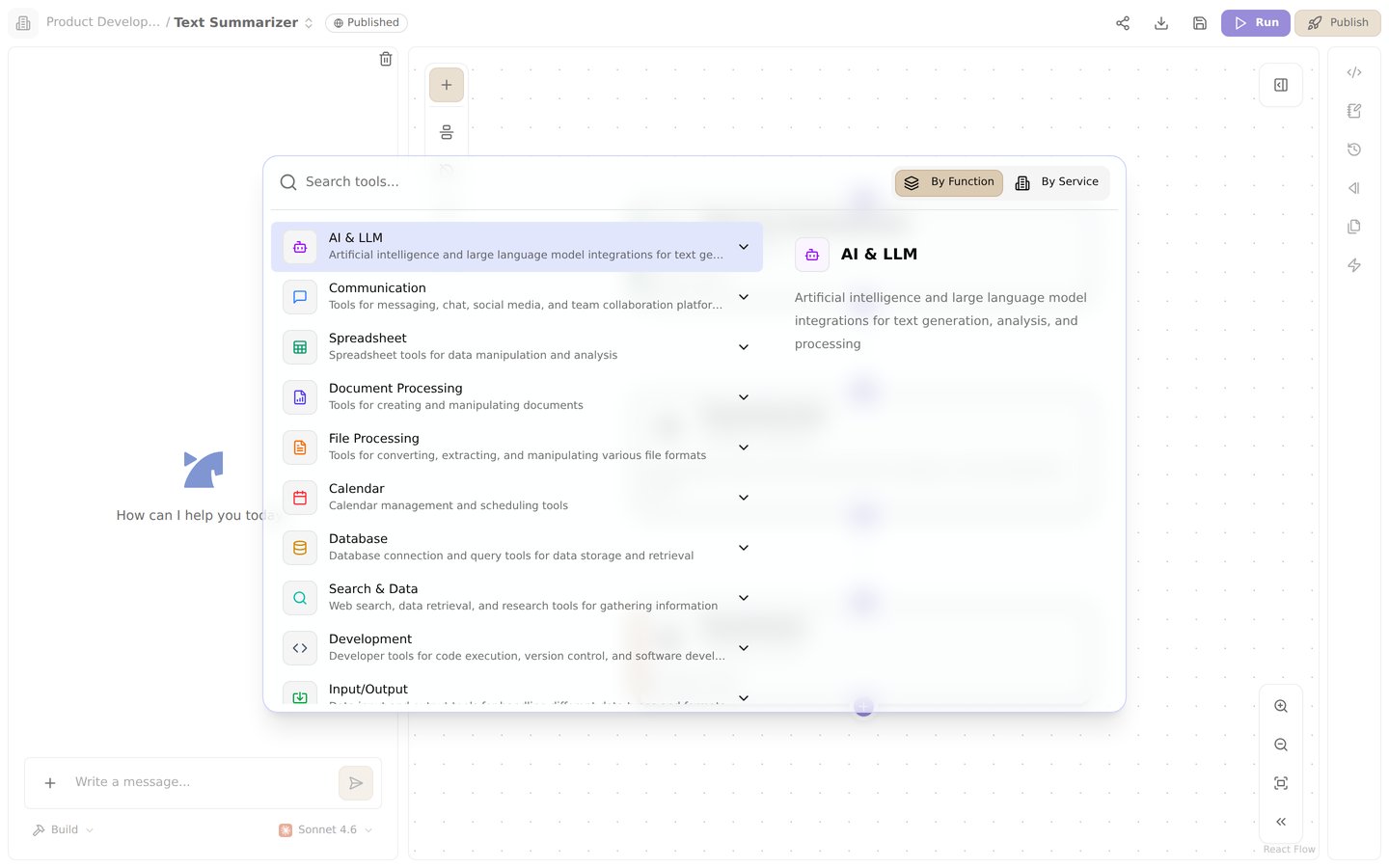
The tool palette in the flow editor. Browse tools by function or by service
Overview
Tools are the building blocks of Jinba Flow workflows. Each step in a flow uses a tool to perform a specific action — from calling AI models and processing files, to integrating with external services and searching the web. Jinba Flow offers a rich collection of tools organized into the categories below, giving you everything you need to build powerful automations. This page covers the tools that are currently documented — more tool documentation is being added continuously.Tool Categories
Input/Output Tools
Tools for receiving data into your flow and producing structured output.- File Input - Fetch files from URLs
- Advanced Input Tools - Webhooks, Slack events, image files, and text files
- Input JSON with Validation - Validate JSON input against a schema
- Output Tools - Create and manage output files and text data
- Output JSON with Validation - Validate JSON output against a schema
AI Tools
Integrate with leading AI models to add intelligence to your workflows.- Gemini - Invoke responses from Google Gemini
- Gemini with File - Generate text from files (PDF, image, audio, video)
- Grok - Invoke responses from xAI Grok
- Jev (TypeSafe AI) - Fast structured decisions (yes/no, choice, score) with calibrated probabilities
- Anthropic - Invoke responses from Claude
- OpenAI - Invoke responses from OpenAI models
- Azure OpenAI - Invoke OpenAI models hosted on Microsoft Azure
- LlamaCloud - Advanced document processing and search
- LlamaCloud Advanced - Advanced search and query with LlamaIndex integration
File Processing Tools
Extract, convert, and validate data from various file formats.- Extract from File - Extract information from files using base64
- Document Processing - Extract and process text from various document formats
- Word Processing - Advanced Word document processing and text highlighting
- Reducto - High-accuracy document parsing, extraction, and splitting
- VTT Parse - Parse WebVTT subtitle/transcript files into structured data
- Marp Presentation - Convert Markdown into presentation files
- Mermaid Diagram - Convert Mermaid syntax into images and PDFs
- Markitdown Convert - Convert a URL to Markdown
- Checker Tools - Data validation and checking for quality assurance
- Jinba Modules Checker V2 - Advanced rule-based document and data validation
- Data Conversion Tools - Convert data between different formats and structures
External Service Integration Tools
Connect your flows to productivity platforms, communication tools, and business services. Productivity:- GitHub - Automate GitHub tasks
- Jira - Manage Jira issues and project progress
- Notion - Automate a Notion workspace
- Google Sheets - Spreadsheet operations using Google Sheets API
- Advanced Google Sheets - Enhanced Google Sheets with get sheet functionality
- Google Spreadsheet Advanced - Bulk data manipulation for Google Spreadsheets
- Google Forms - Create and manage Google Forms
- Excel Operations - Comprehensive Excel file manipulation
- Google Calendar - Automate Google Calendar tasks
- Outlook Calendar - Automate Outlook Calendar tasks
- Chatwork - Connect with the Chatwork API
- SharePoint - Manage SharePoint sites and OneDrive files
- Microsoft Teams - Manage Teams channels and messages
- SmartHR - List, create, update, delete, and invite employees (crews) in SmartHR
- Box - Manage files and folders in Box
- Linear - Manage Linear issues, teams, and project progress
- Zoom - Manage Zoom meetings, participants, and cloud recordings
- Microsoft Users - Look up users in Microsoft Entra ID (Azure AD)
- HubSpot - Create, update, and look up HubSpot CRM contacts
- Gmail - Email operations using Gmail API
- Outlook Mail - List and send emails via Microsoft Outlook
- Slack - Slack messaging platform tools
- Discord - Integrate with a Discord Bot
- LINE - LINE messaging platform tools
- Twilio - Send SMS and WhatsApp messages via Twilio
- Intercom - Create contacts, messages, and customer events in Intercom
- X (Twitter) - Post and retrieve content via the X API
- ChatWork Advanced - Advanced ChatWork messaging and task management
- Faximo FAX Service - Send FAX messages and search FAX history
Search & Data Retrieval Tools
Search the web, query databases, and retrieve information from various sources.- SerpAPI - Search the web using SerpAPI
- PokeAPI - Search for Pokemon data
- YouTube Transcript - Get YouTube video transcripts
- Arxiv Agent - Search and retrieve papers from arXiv
- Exa AI - Search the web using Exa AI
- Perplexity - Search the web using Perplexity
- Pinecone - Query and manage vector indexes in Pinecone
- Teradata - Run queries on Teradata
- Carnot Search - Search for company information
- Azure AI Search - Query Azure AI Search indexes
- AWS Bedrock Knowledge Base - Retrieve from and sync documents to Bedrock knowledge bases
- TinyFish - AI web agent for fetching, searching, and interacting with websites
Database Tools
Run SQL queries against external databases.- Snowflake - Run SQL queries on Snowflake
- PostgreSQL - Run SQL queries on PostgreSQL
Extended Tools
Run custom code, connect via MCP, generate media, and manage content.- Python Sandbox - Run Python code in a sandboxed environment
- Browser Use Sandbox - Run browser automation tasks in an isolated sandbox
- MCP Tools - Model Context Protocol integration for local and remote tool execution
- Shopify - Manage Shopify products and orders
- Netsea - Connect to the Netsea API
- AI Video Generation - Create videos from text descriptions using AI
- WordPress - Create articles on WordPress
- Firecrawl - Automate web crawling and data collection
Jinba Tools
Leverage Jinba’s own platform capabilities within your flows.- Jinba Flows - Run Jinba Flows from within a flow
- Jinba Modules - Advanced data extraction, parsing, and validation
- Vector Search - Semantic search for knowledge bases using vector embeddings
- Jinba Knowledge Base - Update and manage knowledge bases for enhanced AI workflows
How Tools Work
- One tool per step — Each step in a flow executes exactly one tool.
- Configuration — Set up the tool’s behavior using its
configandinputfields. - Result referencing — Access a step’s output in later steps using
{{steps.<step_id>.result}}.