> ## Documentation Index
> Fetch the complete documentation index at: https://docs.jinba.io/llms.txt
> Use this file to discover all available pages before exploring further.
# Introduction
> Welcome to the official documentation for Jinba App Neo (Beta)
**Jinba App Neo is currently in Beta.** Features and screens may change without notice. Send feedback to [contact@carnot.ai](mailto:contact@carnot.ai).
## What is Jinba App Neo?
Jinba App Neo is a next-generation AI agent platform built on Anthropic's Claude. Create an "agent" for each use case and attach skills (playbooks), connectors (external integrations), and knowledge (reference material) to it — then put that purpose-built AI to work through chat.
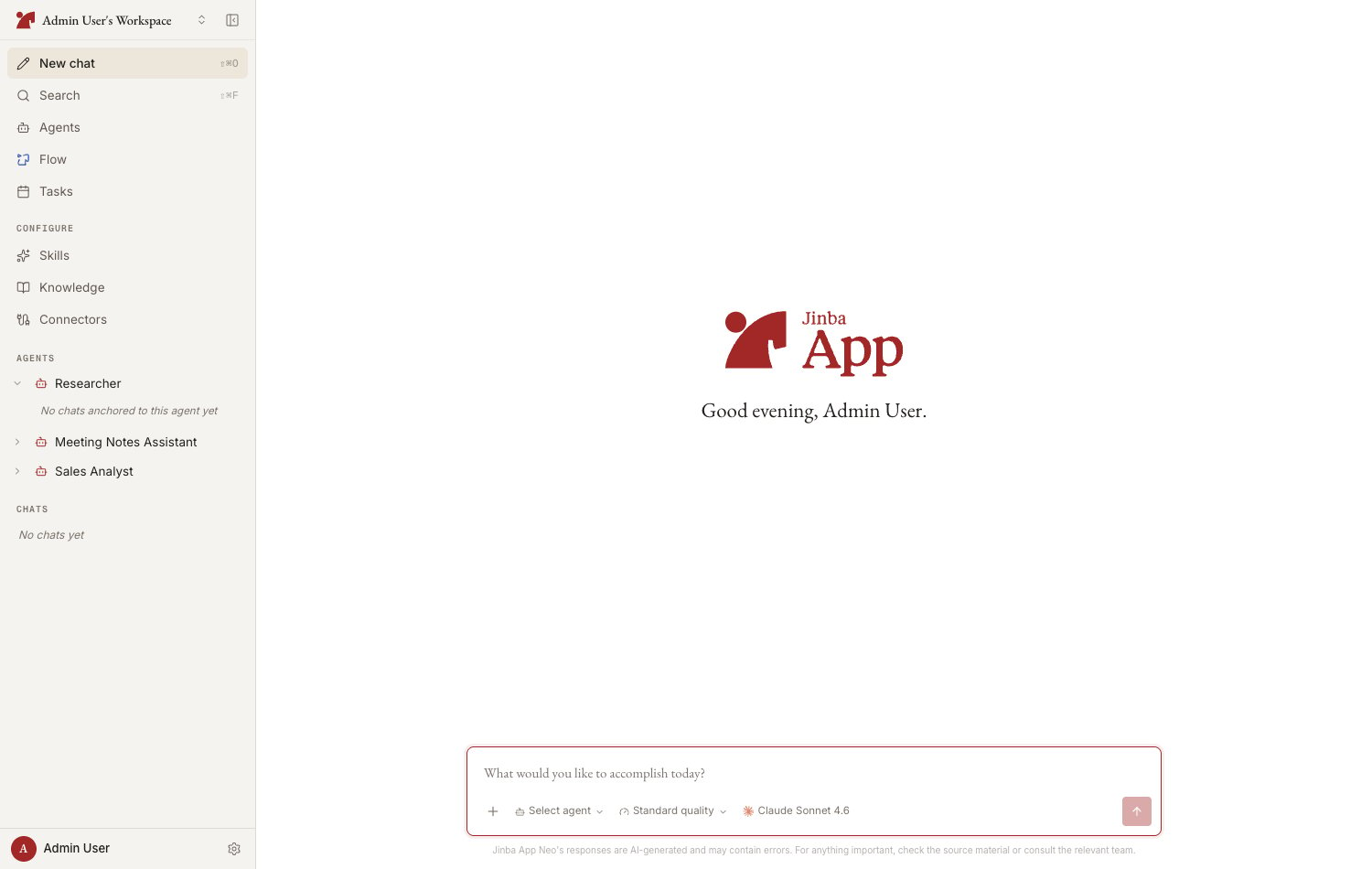 It is the successor to the original Jinba App, with major advances in the following areas:
* **Agent-centric design** — Create multiple "agents," each bundling a model, system prompt, skills, connectors, and knowledge, and switch between them by purpose
* **AI execution environment** — The AI runs in a session environment isolated per message, safely performing file operations, code execution, web search, and more
* **Memory** — The AI learns your preferences and business terminology through chat and applies them in future conversations
* **Native MCP support** — Connect jinba-flow workflows or any MCP server as tools for the AI
## Key features
Work alongside your agents in conversation, with file attachments, a reference picker, and visibility into what the AI is doing
Create conversation partners that bundle skills, connectors, and knowledge, and share them with your team
Register internal documents, URLs, and Notion pages for the AI to ground its answers in
Manage the playbooks and instructions you want the AI to reuse, written in Markdown
Connect personal connectors like Gmail and Slack, jinba-flow, and custom MCP servers as tools for the AI
## How to use this documentation
* **New here?** Start with the [Quickstart](/en/pages/jinba_app_neo/quickstart)
* **Unfamiliar with a term?** See [Core concepts](/en/pages/jinba_app_neo/core-concepts)
* **Want feature details?** Browse the feature pages in the left navigation
* **Stuck?** Check the [FAQ](/en/pages/jinba_app_neo/faq)
* You can open this documentation from inside the app at any time — choose "**Documentation**" in the account menu
## Notes on the Beta
* Some features are rolled out gradually, so what you see may differ depending on your environment
* Screens and features may change in future updates
* Access the app at [https://neo.jinba.io/](https://neo.jinba.io/). To use the product, you need a workspace invitation or an account issued by an administrator
## Who this documentation is for
This documentation is for all end users of Jinba App Neo. No technical background is required (except for a few administrative features such as connecting custom MCP servers).
It is the successor to the original Jinba App, with major advances in the following areas:
* **Agent-centric design** — Create multiple "agents," each bundling a model, system prompt, skills, connectors, and knowledge, and switch between them by purpose
* **AI execution environment** — The AI runs in a session environment isolated per message, safely performing file operations, code execution, web search, and more
* **Memory** — The AI learns your preferences and business terminology through chat and applies them in future conversations
* **Native MCP support** — Connect jinba-flow workflows or any MCP server as tools for the AI
## Key features
Work alongside your agents in conversation, with file attachments, a reference picker, and visibility into what the AI is doing
Create conversation partners that bundle skills, connectors, and knowledge, and share them with your team
Register internal documents, URLs, and Notion pages for the AI to ground its answers in
Manage the playbooks and instructions you want the AI to reuse, written in Markdown
Connect personal connectors like Gmail and Slack, jinba-flow, and custom MCP servers as tools for the AI
## How to use this documentation
* **New here?** Start with the [Quickstart](/en/pages/jinba_app_neo/quickstart)
* **Unfamiliar with a term?** See [Core concepts](/en/pages/jinba_app_neo/core-concepts)
* **Want feature details?** Browse the feature pages in the left navigation
* **Stuck?** Check the [FAQ](/en/pages/jinba_app_neo/faq)
* You can open this documentation from inside the app at any time — choose "**Documentation**" in the account menu
## Notes on the Beta
* Some features are rolled out gradually, so what you see may differ depending on your environment
* Screens and features may change in future updates
* Access the app at [https://neo.jinba.io/](https://neo.jinba.io/). To use the product, you need a workspace invitation or an account issued by an administrator
## Who this documentation is for
This documentation is for all end users of Jinba App Neo. No technical background is required (except for a few administrative features such as connecting custom MCP servers).