> ## Documentation Index
> Fetch the complete documentation index at: https://docs.jinba.io/llms.txt
> Use this file to discover all available pages before exploring further.
# Agent Management Overview
> Screen layout and basic features of Agent Management
## What is Agent Management
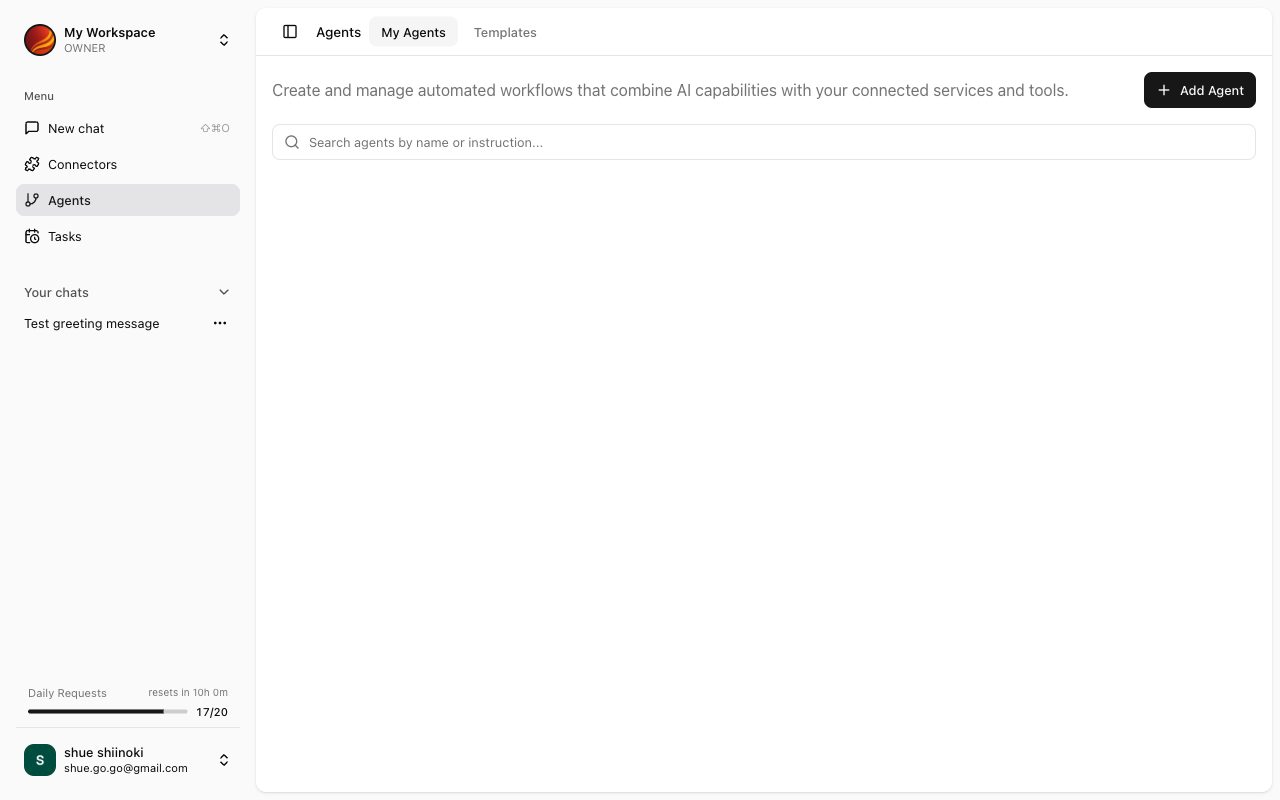
The Agent Management screen allows you to create and manage AI agents. Agents are reusable AI configurations specialized for specific tasks or purposes.
 ## What are Agents
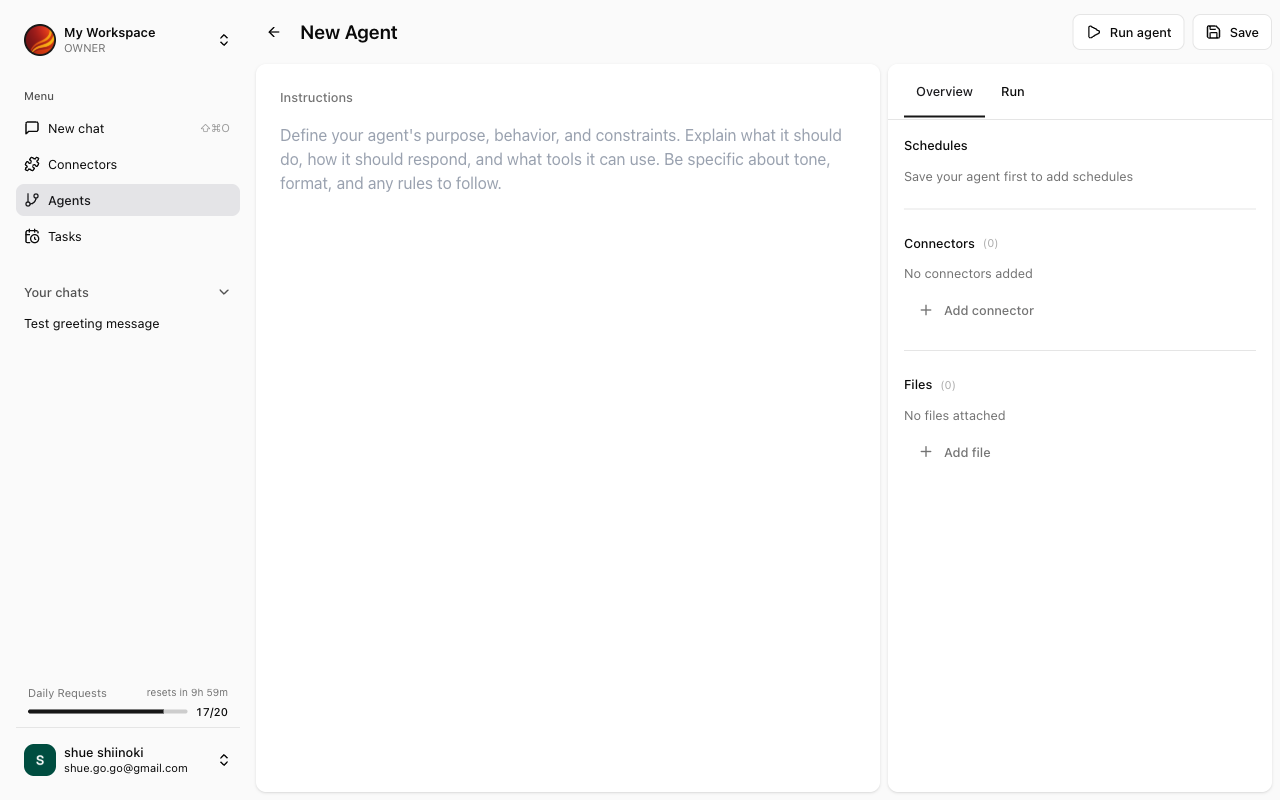
Agents are defined by combining the following elements:
| Element | Description |
| ------------------- | ------------------------------------------ |
| **Instructions** | Specific instructions for the AI |
| **Connectors** | Connections to external services |
| **Reference Files** | Documents and data for the AI to reference |
By setting these up in advance, you don't need to repeat the same settings each time you chat.
## Screen Layout
The Agent Management screen consists of the following sections:
### Agent List
Displays a list of created agents.
For more details, see [Agent List](/en/pages/jinba_app/agents/agent-list).
### Agent Builder
The screen for creating and editing new agents.
## What are Agents
Agents are defined by combining the following elements:
| Element | Description |
| ------------------- | ------------------------------------------ |
| **Instructions** | Specific instructions for the AI |
| **Connectors** | Connections to external services |
| **Reference Files** | Documents and data for the AI to reference |
By setting these up in advance, you don't need to repeat the same settings each time you chat.
## Screen Layout
The Agent Management screen consists of the following sections:
### Agent List
Displays a list of created agents.
For more details, see [Agent List](/en/pages/jinba_app/agents/agent-list).
### Agent Builder
The screen for creating and editing new agents.
 For more details, see [Agent Builder](/en/pages/jinba_app/agents/agent-builder).
## Access Control
Agent editing is only permitted for workspace owners.
| Operation | Member | Owner |
| ------------------ | ------ | ----- |
| View agent list | ✓ | ✓ |
| Use agents | ✓ | ✓ |
| Create/edit agents | - | ✓ |
| Delete agents | - | ✓ |
Members can still chat using published agents.
## Accessing Agent Management
Select "Agents" from the side menu.
The agent list is displayed.
## Key Features
Search, duplicate, edit, and delete agents
Create and configure agents
View detailed agent information
Publish agents and run as apps
## Agent Use Cases
### For Individuals
* **Instructions**: "Summarize the latest news articles and list the important points as bullet points"
* **Connectors**: RSS feeds, News APIs
* **Reference Files**: None
* **Instructions**: "Extract important points from uploaded learning materials and create review notes"
* **Connectors**: None
* **Reference Files**: Educational PDFs, Lecture materials
* **Instructions**: "Suggest recommended tourist spots and travel routes considering budget and schedule"
* **Connectors**: None
* **Reference Files**: Travel guides
### For Teams & Business
* **Instructions**: "Retrieve this month's deal data from Salesforce and create a weekly sales report"
* **Connectors**: Salesforce
* **Reference Files**: Report template
* **Instructions**: "Reference the FAQ document to answer user questions"
* **Connectors**: None
* **Reference Files**: FAQ document, Product manual
* **Instructions**: "Analyze sales data and report trends and anomalies"
* **Connectors**: Google Sheets, BigQuery
* **Reference Files**: Analysis criteria document
For more details, see [Agent Builder](/en/pages/jinba_app/agents/agent-builder).
## Access Control
Agent editing is only permitted for workspace owners.
| Operation | Member | Owner |
| ------------------ | ------ | ----- |
| View agent list | ✓ | ✓ |
| Use agents | ✓ | ✓ |
| Create/edit agents | - | ✓ |
| Delete agents | - | ✓ |
Members can still chat using published agents.
## Accessing Agent Management
Select "Agents" from the side menu.
The agent list is displayed.
## Key Features
Search, duplicate, edit, and delete agents
Create and configure agents
View detailed agent information
Publish agents and run as apps
## Agent Use Cases
### For Individuals
* **Instructions**: "Summarize the latest news articles and list the important points as bullet points"
* **Connectors**: RSS feeds, News APIs
* **Reference Files**: None
* **Instructions**: "Extract important points from uploaded learning materials and create review notes"
* **Connectors**: None
* **Reference Files**: Educational PDFs, Lecture materials
* **Instructions**: "Suggest recommended tourist spots and travel routes considering budget and schedule"
* **Connectors**: None
* **Reference Files**: Travel guides
### For Teams & Business
* **Instructions**: "Retrieve this month's deal data from Salesforce and create a weekly sales report"
* **Connectors**: Salesforce
* **Reference Files**: Report template
* **Instructions**: "Reference the FAQ document to answer user questions"
* **Connectors**: None
* **Reference Files**: FAQ document, Product manual
* **Instructions**: "Analyze sales data and report trends and anomalies"
* **Connectors**: Google Sheets, BigQuery
* **Reference Files**: Analysis criteria document