> ## Documentation Index
> Fetch the complete documentation index at: https://docs.jinba.io/llms.txt
> Use this file to discover all available pages before exploring further.
# What is Jinba Flow?
> A product for designing and building workflows
Jinba Flow is a product for designing and building workflows. Generate flows automatically through chat, then visually review and edit them with an intuitive flowchart interface. Workflows can be published as APIs or batch processes for easy reuse.
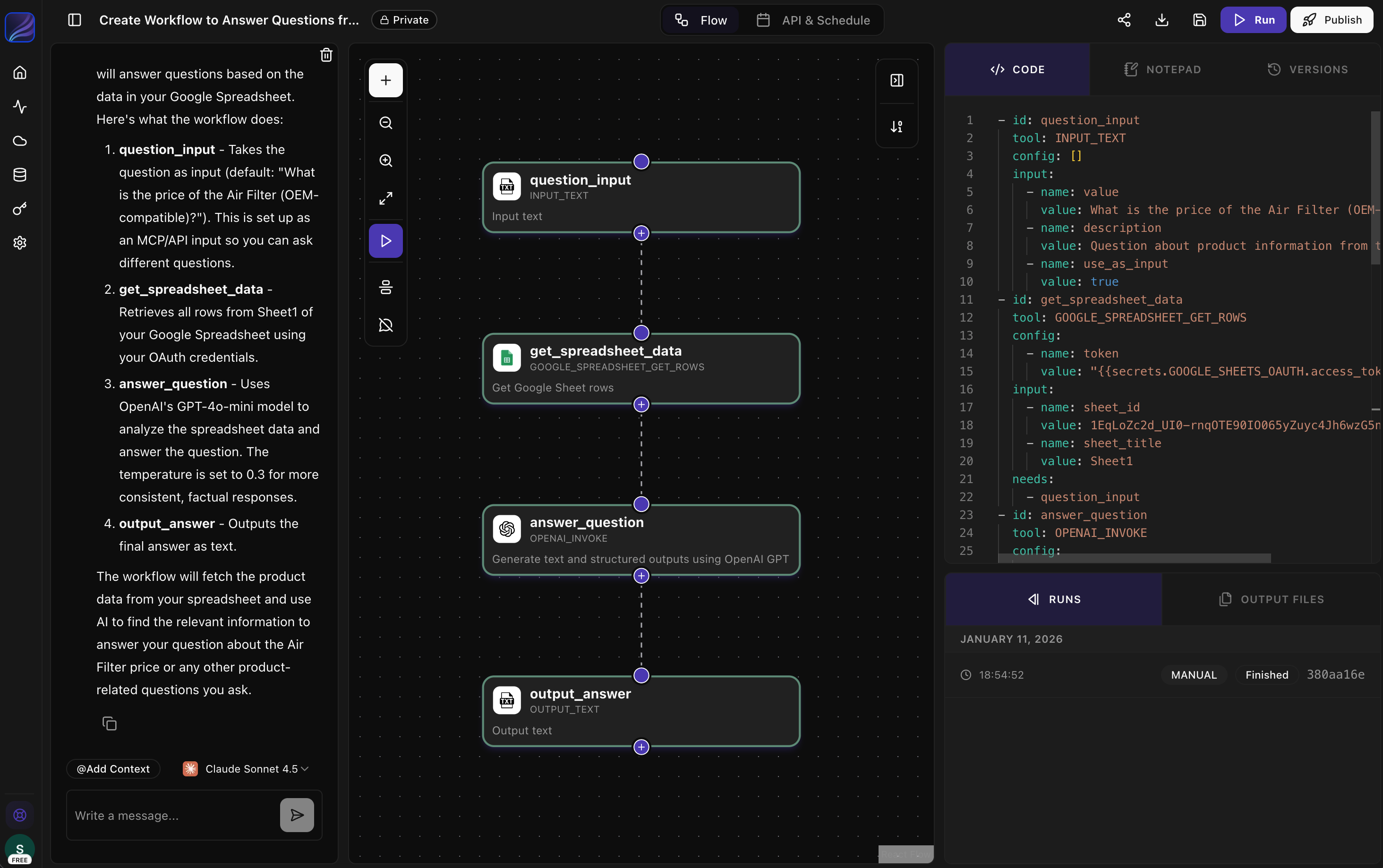 ## Workflow Automation in 3 Steps
**Auto-generate workflows with natural language**
Describe what you want and get instant flow generation
Intuitive drag & drop for flexible editing and building
Supports complex logic: branches, loops, and more
**Diverse tools & secure AI integration**
Connect Slack, Gmail, Notion, GitHub, Python, and more
Easily integrate GPT, Claude, Gemini via MCP
Safe execution environment for advanced business tasks
**One-click publish and operate**
Deploy instantly as REST API
Publish as MCP server for agent integration
Easy to call from existing systems and apps
## Use Cases
Monitor channels, summarize discussions, and post updates automatically
Extract, transform, and load data across multiple sources
Process documents with AI for extraction, summarization, and insights
## Enterprise Features
For organizations requiring advanced security and control:
* **Private Hosting**: On-premises or private cloud deployment
* **SSO & RBAC**: Single Sign-On and role-based access control
* **Audit Logs**: Detailed tracking for compliance
* **Dedicated Support**: Engineering support for workflow development
* **Private Models**: Use AWS Bedrock, Azure AI, or custom models
## Get Started
Build your first workflow in 10 minutes
Learn the key terms and concepts
## Workflow Automation in 3 Steps
**Auto-generate workflows with natural language**
Describe what you want and get instant flow generation
Intuitive drag & drop for flexible editing and building
Supports complex logic: branches, loops, and more
**Diverse tools & secure AI integration**
Connect Slack, Gmail, Notion, GitHub, Python, and more
Easily integrate GPT, Claude, Gemini via MCP
Safe execution environment for advanced business tasks
**One-click publish and operate**
Deploy instantly as REST API
Publish as MCP server for agent integration
Easy to call from existing systems and apps
## Use Cases
Monitor channels, summarize discussions, and post updates automatically
Extract, transform, and load data across multiple sources
Process documents with AI for extraction, summarization, and insights
## Enterprise Features
For organizations requiring advanced security and control:
* **Private Hosting**: On-premises or private cloud deployment
* **SSO & RBAC**: Single Sign-On and role-based access control
* **Audit Logs**: Detailed tracking for compliance
* **Dedicated Support**: Engineering support for workflow development
* **Private Models**: Use AWS Bedrock, Azure AI, or custom models
## Get Started
Build your first workflow in 10 minutes
Learn the key terms and concepts