> ## Documentation Index
> Fetch the complete documentation index at: https://docs.jinba.io/llms.txt
> Use this file to discover all available pages before exploring further.
# Credit Costs
> Understand the credit costs for different tools in Jinba Flow
 ## Overview
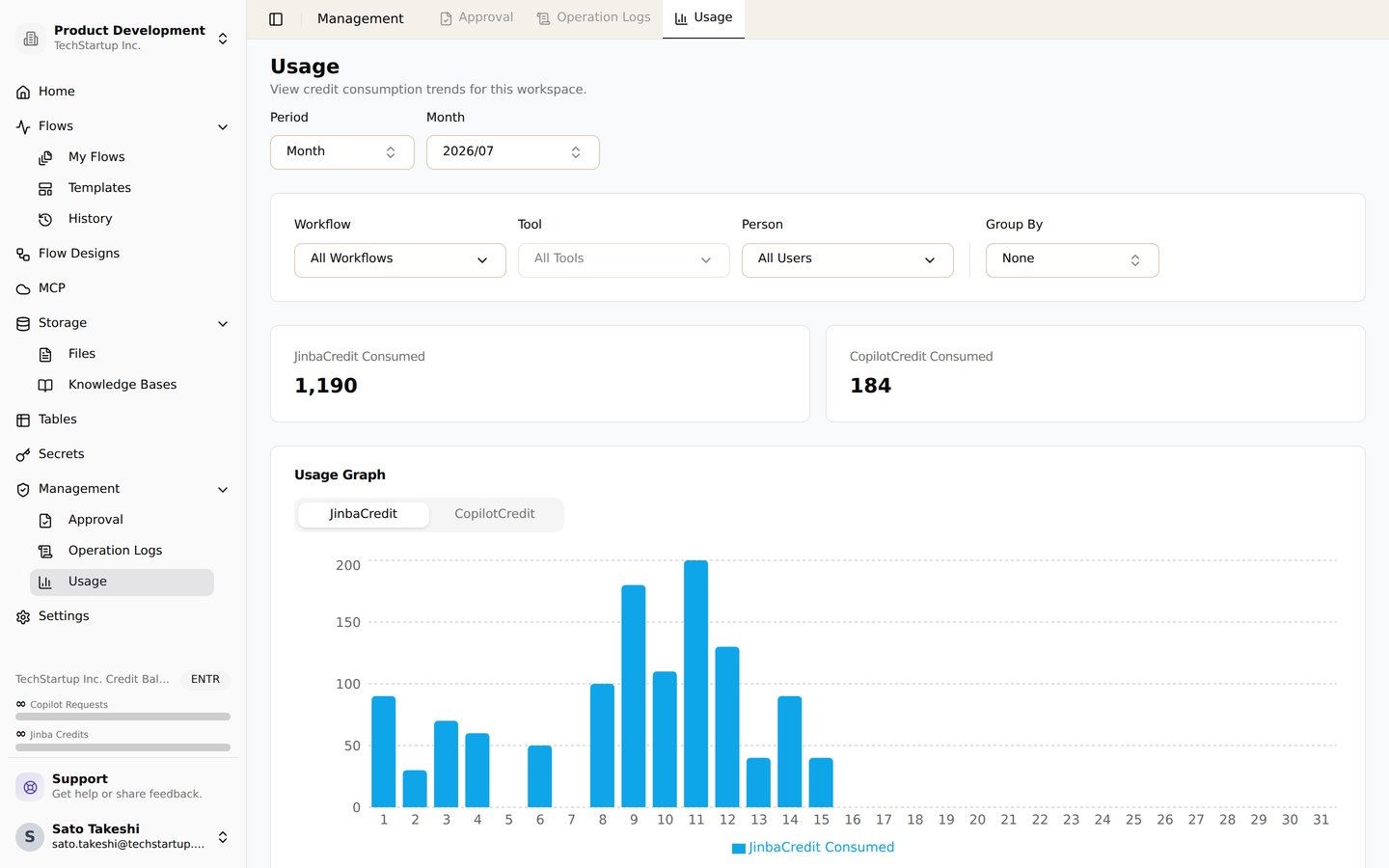
Jinba Flow uses two types of credits: **Jinba Credits** and **Copilot Credits**. Each credit type serves different purposes and has different reset periods.
> Note: Credits and subscription tiers are managed at the **organization** level.
> All members of an organization share the same subscription plan and pooled credits.
### At a Glance
* Some tools consume **Jinba Credits** when you run them.
* For tools that support it, you can **bring your own API key** to skip Jinba Credit consumption.
* The **required credits** for Jinba-enabled tools are shown as a badge on the tool configuration page.
## Credit Types
### Jinba Credits
**Jinba Credits** are used for executing tools in workflows. They allow you to use Jinba's API keys without needing your own credentials. Credits are pooled per organization.
* **Reset Period**: Monthly (resets on subscription renewal or every 30 days for enterprise users)
* **Usage**: Deducted when running workflow tools like AI models, search APIs, and data processing services
* **Cost Variation**: Different tools consume different amounts (1, 2, 4, 5, or 10 credits per execution)
* **Custom API Key Bypass**: You can provide your own API keys to bypass credit charges for certain tools
* **Subscription Limits**:
* Free: 100 credits/month
* Standard: 800 credits/month
* Professional: 10,000 credits/month
* Enterprise: Unlimited
### Copilot Credits
**Copilot Credits** are used for AI assistance features and copilot functionality, such as generating step descriptions, summaries, and metadata. Credits are pooled per organization.
* **Reset Period**: Daily (resets every day at midnight)
* **Usage**: Deducted when using copilot features (1 credit per request)
* **Cost**: 1 credit per copilot request
* **Subscription Limits**:
* Free: 100 credits/day
* Standard: 300 credits/day
* Professional: 500 credits/day
* Enterprise: Unlimited
## Jinba Credit Cost Structure
### Model-Based Pricing (LLM Tools)
The following LLM tools use **dynamic pricing** based on the actual model and estimated token usage:
* **OPENAI\_INVOKE** / **OPENAI\_INVOKE\_WITH\_FILE**
* **ANTHROPIC\_INVOKE**
* **GEMINI\_INVOKE** / **GEMINI\_INVOKE\_WITH\_FILE** / **GEMINI\_INVOKE\_WITH\_IMAGE**
**How it works:**
1. Cost is calculated based on the specific model you select (e.g., GPT-4o, Claude Sonnet 4.6, Gemini 2.5 Flash)
2. Uses token estimates (1,500 input / 750 output) based on typical usage patterns
3. Falls back to **2 credits** if model information is unavailable
**Example costs:**
* GPT-4o: \~1 credit
* Claude Sonnet 4.6: \~1 credit
* GPT-5.2 Pro: \~23 credits (for high token usage)
### 1 Credit Per Use
These tools consume **1 credit** each time they are executed:
* **EXAAI\_SEARCH** - AI-powered search using Exa (can use your own API key)
* **PERPLEXITY\_SEARCH** - Search using Perplexity AI (can use your own API key)
* **SERPAPI\_SEARCH** - Search using SerpAPI (can use your own API key)
* **FIRECRAWL\_SCRAPE** - Scrape web content using Firecrawl (can use your own API key)
* **ARXIV\_INVOKE\_AGENT** - Access research papers from arXiv (always requires credits)
* **YOUTUBE\_GET\_TRANSCRIPT** - Extract transcripts from YouTube videos (always requires credits)
* **PYTHON\_SANDBOX\_RUN** - Execute Python code in a secure sandbox (always requires credits)
### 2 Credits Per Use
These tools consume **2 credits** each time they are executed:
* **GROK\_CHAT** - Chat with xAI's Grok model (can use your own API key)
* **GEMINI\_INVOKE** - Use Google's Gemini AI model (can use your own API key)
* **GEMINI\_INVOKE\_WITH\_FILE** - Use Gemini with file inputs (can use your own API key)
* **GEMINI\_INVOKE\_WITH\_IMAGE** - Use Gemini with image inputs (can use your own API key)
* **ANTHROPIC\_INVOKE** - Use Anthropic's Claude models (can use your own API key)
* **OPENAI\_INVOKE** - Use OpenAI's GPT models (can use your own API key)
* **OPENAI\_INVOKE\_WITH\_FILE** - Use OpenAI's GPT models with file inputs (can use your own API key)
* **LLAMA\_CLOUD\_PARSE** - Parse documents with LlamaCloud (can use your own API key)
### 6 Credits Per Use
These tools consume **6 credits** each time they are executed:
* **OPENAI\_DEEP\_RESEARCH** - Perform comprehensive research with OpenAI (always requires credits)
### 5 Credits Per Use
These tools consume **5 credits** each time they are executed:
* **JINBA\_FLEX\_PARSER** - Flexible document parsing (can use your own API key)
### 52 Credits Per Use
These tools consume **52 credits** each time they are executed:
* **OPENAI\_SORA2** - Generate videos using Sora 2 (can use your own API key)
## Copilot Credit Usage
Copilot Credits are consumed when using AI assistance features:
* **Step Description Generation**: 1 credit per request
* **Flow Summary Generation**: 1 credit per request
* **Metadata Generation**: 1 credit per request
* **Cron Expression Parsing**: 1 credit per request
* **Chat/Copilot Conversations**: 1 credit per request
## Bring Your Own API Key
For tools that support it, you can provide your own API keys to avoid paying credits:
When a tool supports "bring your own API key," you can configure your own credentials to bypass credit charges. Tools marked with "always requires credits" will consume credits regardless of configuration.
### How to Configure Your API Keys
1. Navigate to the **Credentials** section in your workspace settings
2. Select the appropriate service (e.g., Anthropic, OpenAI, Gemini)
3. Enter your API key
4. Save your configuration
Once configured, the system will use your API key instead of consuming credits when you use those tools.
### Tools That Always Require Credits
Some tools always require credits because they use Jinba's infrastructure or specialized services:
* **ARXIV\_INVOKE\_AGENT** (1 credit) - Uses OpenAI API + E2B sandbox
* **YOUTUBE\_GET\_TRANSCRIPT** (1 credit) - Uses Smartproxy residential proxy
* **PYTHON\_SANDBOX\_RUN** (1 credit) - Uses E2B code interpreter sandbox
* **OPENAI\_DEEP\_RESEARCH** (6 credits) - Multiple LLM calls + processing
These tools cannot use external API keys and will always deduct from your credit balance.
## Overview
Jinba Flow uses two types of credits: **Jinba Credits** and **Copilot Credits**. Each credit type serves different purposes and has different reset periods.
> Note: Credits and subscription tiers are managed at the **organization** level.
> All members of an organization share the same subscription plan and pooled credits.
### At a Glance
* Some tools consume **Jinba Credits** when you run them.
* For tools that support it, you can **bring your own API key** to skip Jinba Credit consumption.
* The **required credits** for Jinba-enabled tools are shown as a badge on the tool configuration page.
## Credit Types
### Jinba Credits
**Jinba Credits** are used for executing tools in workflows. They allow you to use Jinba's API keys without needing your own credentials. Credits are pooled per organization.
* **Reset Period**: Monthly (resets on subscription renewal or every 30 days for enterprise users)
* **Usage**: Deducted when running workflow tools like AI models, search APIs, and data processing services
* **Cost Variation**: Different tools consume different amounts (1, 2, 4, 5, or 10 credits per execution)
* **Custom API Key Bypass**: You can provide your own API keys to bypass credit charges for certain tools
* **Subscription Limits**:
* Free: 100 credits/month
* Standard: 800 credits/month
* Professional: 10,000 credits/month
* Enterprise: Unlimited
### Copilot Credits
**Copilot Credits** are used for AI assistance features and copilot functionality, such as generating step descriptions, summaries, and metadata. Credits are pooled per organization.
* **Reset Period**: Daily (resets every day at midnight)
* **Usage**: Deducted when using copilot features (1 credit per request)
* **Cost**: 1 credit per copilot request
* **Subscription Limits**:
* Free: 100 credits/day
* Standard: 300 credits/day
* Professional: 500 credits/day
* Enterprise: Unlimited
## Jinba Credit Cost Structure
### Model-Based Pricing (LLM Tools)
The following LLM tools use **dynamic pricing** based on the actual model and estimated token usage:
* **OPENAI\_INVOKE** / **OPENAI\_INVOKE\_WITH\_FILE**
* **ANTHROPIC\_INVOKE**
* **GEMINI\_INVOKE** / **GEMINI\_INVOKE\_WITH\_FILE** / **GEMINI\_INVOKE\_WITH\_IMAGE**
**How it works:**
1. Cost is calculated based on the specific model you select (e.g., GPT-4o, Claude Sonnet 4.6, Gemini 2.5 Flash)
2. Uses token estimates (1,500 input / 750 output) based on typical usage patterns
3. Falls back to **2 credits** if model information is unavailable
**Example costs:**
* GPT-4o: \~1 credit
* Claude Sonnet 4.6: \~1 credit
* GPT-5.2 Pro: \~23 credits (for high token usage)
### 1 Credit Per Use
These tools consume **1 credit** each time they are executed:
* **EXAAI\_SEARCH** - AI-powered search using Exa (can use your own API key)
* **PERPLEXITY\_SEARCH** - Search using Perplexity AI (can use your own API key)
* **SERPAPI\_SEARCH** - Search using SerpAPI (can use your own API key)
* **FIRECRAWL\_SCRAPE** - Scrape web content using Firecrawl (can use your own API key)
* **ARXIV\_INVOKE\_AGENT** - Access research papers from arXiv (always requires credits)
* **YOUTUBE\_GET\_TRANSCRIPT** - Extract transcripts from YouTube videos (always requires credits)
* **PYTHON\_SANDBOX\_RUN** - Execute Python code in a secure sandbox (always requires credits)
### 2 Credits Per Use
These tools consume **2 credits** each time they are executed:
* **GROK\_CHAT** - Chat with xAI's Grok model (can use your own API key)
* **GEMINI\_INVOKE** - Use Google's Gemini AI model (can use your own API key)
* **GEMINI\_INVOKE\_WITH\_FILE** - Use Gemini with file inputs (can use your own API key)
* **GEMINI\_INVOKE\_WITH\_IMAGE** - Use Gemini with image inputs (can use your own API key)
* **ANTHROPIC\_INVOKE** - Use Anthropic's Claude models (can use your own API key)
* **OPENAI\_INVOKE** - Use OpenAI's GPT models (can use your own API key)
* **OPENAI\_INVOKE\_WITH\_FILE** - Use OpenAI's GPT models with file inputs (can use your own API key)
* **LLAMA\_CLOUD\_PARSE** - Parse documents with LlamaCloud (can use your own API key)
### 6 Credits Per Use
These tools consume **6 credits** each time they are executed:
* **OPENAI\_DEEP\_RESEARCH** - Perform comprehensive research with OpenAI (always requires credits)
### 5 Credits Per Use
These tools consume **5 credits** each time they are executed:
* **JINBA\_FLEX\_PARSER** - Flexible document parsing (can use your own API key)
### 52 Credits Per Use
These tools consume **52 credits** each time they are executed:
* **OPENAI\_SORA2** - Generate videos using Sora 2 (can use your own API key)
## Copilot Credit Usage
Copilot Credits are consumed when using AI assistance features:
* **Step Description Generation**: 1 credit per request
* **Flow Summary Generation**: 1 credit per request
* **Metadata Generation**: 1 credit per request
* **Cron Expression Parsing**: 1 credit per request
* **Chat/Copilot Conversations**: 1 credit per request
## Bring Your Own API Key
For tools that support it, you can provide your own API keys to avoid paying credits:
When a tool supports "bring your own API key," you can configure your own credentials to bypass credit charges. Tools marked with "always requires credits" will consume credits regardless of configuration.
### How to Configure Your API Keys
1. Navigate to the **Credentials** section in your workspace settings
2. Select the appropriate service (e.g., Anthropic, OpenAI, Gemini)
3. Enter your API key
4. Save your configuration
Once configured, the system will use your API key instead of consuming credits when you use those tools.
### Tools That Always Require Credits
Some tools always require credits because they use Jinba's infrastructure or specialized services:
* **ARXIV\_INVOKE\_AGENT** (1 credit) - Uses OpenAI API + E2B sandbox
* **YOUTUBE\_GET\_TRANSCRIPT** (1 credit) - Uses Smartproxy residential proxy
* **PYTHON\_SANDBOX\_RUN** (1 credit) - Uses E2B code interpreter sandbox
* **OPENAI\_DEEP\_RESEARCH** (6 credits) - Multiple LLM calls + processing
These tools cannot use external API keys and will always deduct from your credit balance.